Repainting Seoul in 51 minutes, then making it move
TL;DR
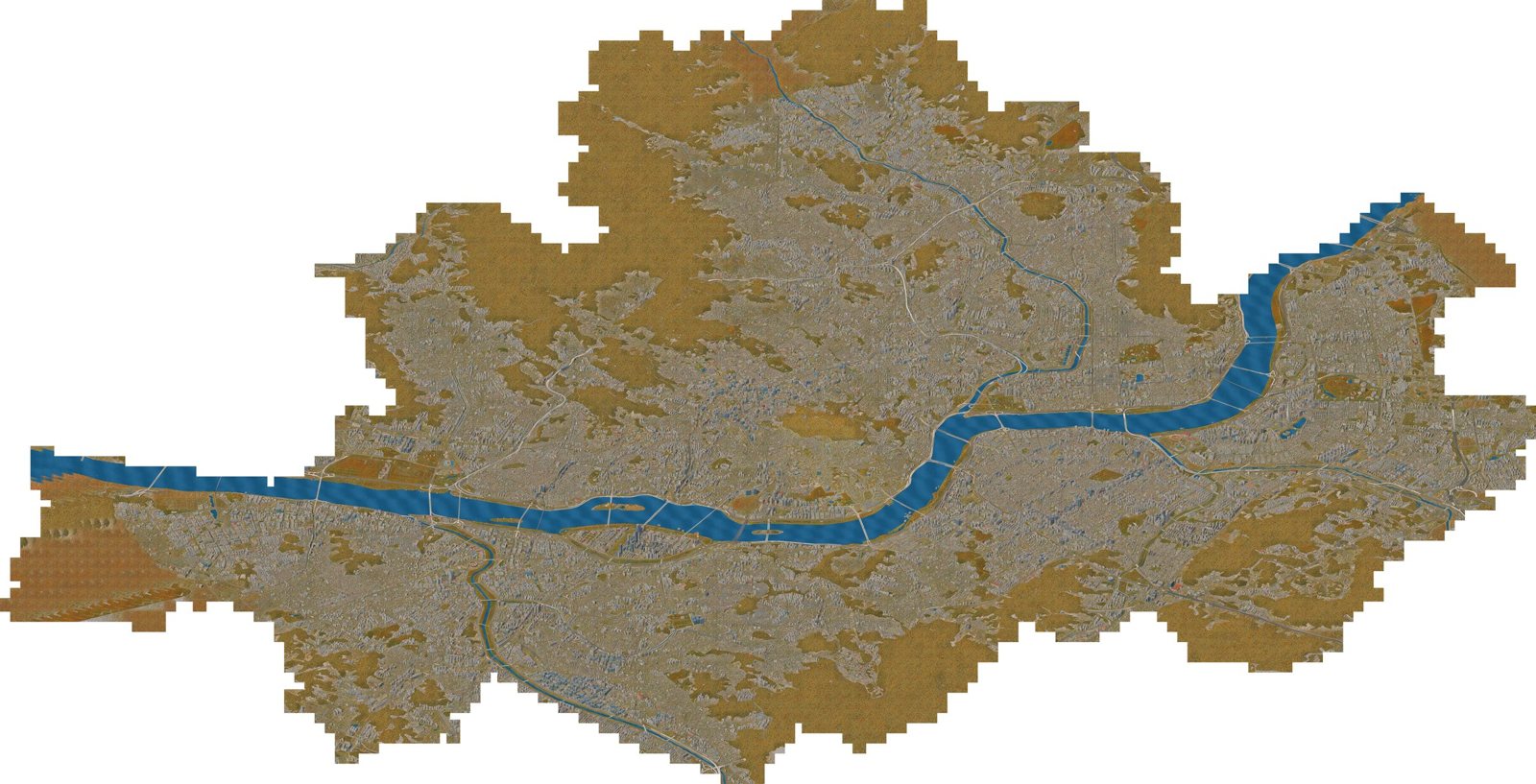
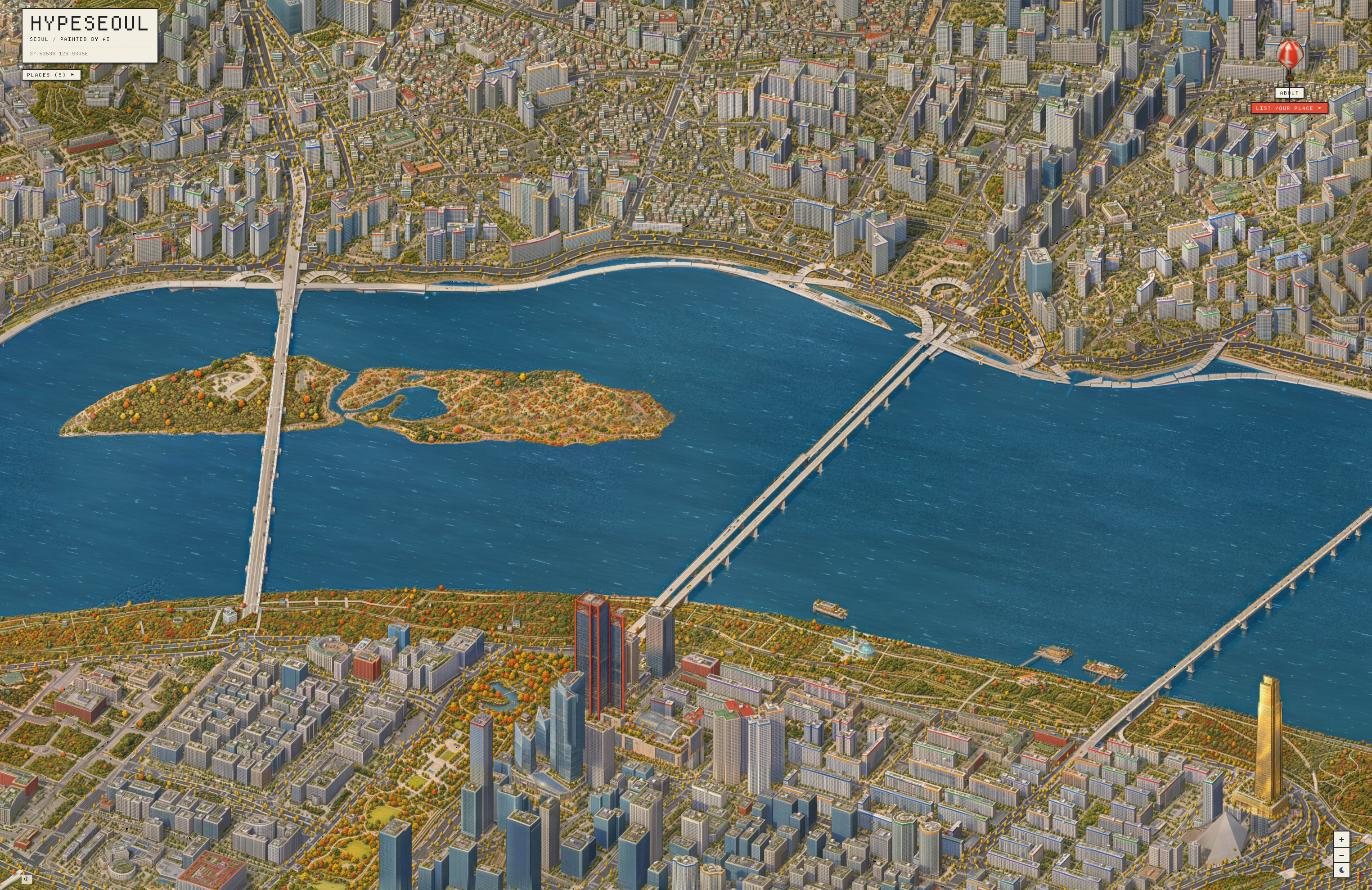
HypeSeoul is an isometric, hand-painted-looking map of Seoul. Under it is a three.js engine that builds the city in 3D from open map data. I fine-tuned an open image model on 33 pairs of "engine render → painting", then used it to repaint all 6,394 tiles of the city (603 km²) on 10 rented A100s in 51 minutes. On top of the painting, a live layer runs cars, boats, people, events and day/night in Seoul time. Some subway lines (1, 2, 3 and Gyeongui–Jungang) are driven by real operating data from the Seoul city government, on a key that allows 1,000 calls a day.
Things that went wrong are most of this post.
Why
I was browsing and came across isometric.nyc by Andy Coenen. It is New York redrawn as an isometric map: real terrain and buildings are rendered, then a fine-tuned image model repaints the render tile by tile. I wanted the same thing for Seoul. It had to look like Seoul from the air, with the Han River and the landmarks readable. And I wanted one more thing. The New York map is beautiful, but nothing moves in it. I wanted cars, trains and people.
HypeSeoul is an independent project inspired by isometric.nyc. There is no official relationship with Andy Coenen. I followed the method from his public write-up (render the city in 3D, repaint it with a fine-tuned image-edit model, roughly how many training pairs) but reused none of his code: the engine, training and tile tools here are all new. What I wanted to add was:
- a 3D Seoul under the painting, aligned to it pixel for pixel,
- a city that moves on top of it,
- day and night that follow the clock in Seoul.
It started as the opening screen of a different site. The map kept growing until it became the site.
Architecture
Offline pipeline
 OSM (buildings, roads, water, parks) ┐
 Overture Maps (missing buildings)    ├─ bake ─> seoul.bin (~585k buildings, terrain, land-use map)
 MOLIT building data (floor counts)   │
 DEM (terrain)                        ┘
            │
            v
 three.js engine ── Playwright captures 1024×1024 tiles (0.3 m/px, 768 px stride, 256 px overlap)
            │
            v
 FLUX.2 klein base 4B + edit LoRA (Modal, 10× A100, 8 steps, guidance 1)
            │
            v
 water_qa → water_fix → forest_grade → harmonize → shade      (automatic fix-up chain)
            │
            ├── landmark / bridge / parking patches (repainted locally, then ECC-aligned)
            v
 build_pyramid: 768 px RGBA WebP, z0–8, alpha = Seoul's boundary
            │                          lights.py: engine buildings → night-light pyramid
            v                                   │
 static object storage <────────────────────────┘
            │
            v
 browser: paint.mjs fetches tiles and composites them over the engine
The one thing that holds it together: the same camera
The engine camera is orthographic with a fixed angle (yaw −0.42, pitch 0.56 rad). So a painting only ever translates and scales on screen. Going from world coordinates (x, z, height y) to painting pixels is a single affine map. I measured it in the browser at 0.3 m/px:
// engine/preview.mjs — canvas px = anchorPx + AX·dx + AZ·dz + AY·dy (px per metre)
const AX = [3.0436, -.7220], AZ = [1.3592, 1.6167], AY = [0, -2.8242], Y0 = 18.8516, REF = .3;
The same constants are copied into the Python tools. Checking painted water against engine water, projecting OSM footprints onto the painting, computing lit windows at night, and putting cars on painted roads all use this one matrix. Almost every fix below works only because the camera never changed.
Per-frame passes
render() in engine/scene.mjs:
function render() {
  scene.background.copy(bgDay).lerp(bgNight, U.uNight.value);
  applyView();
  renderShadow();                                              // 1. sun shadow map
  renderer.setRenderTarget(rt); renderer.render(scene, cam);   // 2. low-res main pass (+depth)
  placePainting();                                             // 3. painted tiles → 4. moving-things mask
  renderGlow();                                                // 5. additive light effects
  renderer.setRenderTarget(null); renderer.render(postScene, postCam);   // 6. post composite
}
 shadowRT (4096², phones 2048²) ─┐
 rt: low-res colour + depth ─────┼─> POST: depth outlines → AO → night bloom → grading
 paint.rt: tiles (device res) ───┤        → paint composite mix(c, paint, a·(1−mask))
 rtMove: moving-things mask ─────┤        → + glow
 rtGlow: light effects (layer 2) ┘
- Main pass. Rendered at screen size divided by
pixel(default 2) and stretched with nearest filtering. That is where the pixel look comes from. Depth goes into a floatDepthTexturethat later passes share. - Outlines. Second difference of linear depth. It is zero on any plane, whatever the slope, and spikes only at silhouettes. Threshold is
max(3, mpp × pixel × 2.4), so it scales with zoom. - AO. 8 directions at 3 px and 6 px. Darkens up to 42% where something stands in front.
Deep dive 1: from an image quota to our own model
The quota wall
The first version repainted engine renders with GPT image generation, tile by tile (1024 px, 0.3 m/px, 768 px stride, with a strip of the already-painted neighbour attached so edges would match). Yeouido alone looked great. Two problems. GPT moved the Han River, added ponds that do not exist, and put towers in parks. And I hit the image limit on my plan at about 348 images in a day. Seoul is about 6,000 tiles, plus night.
Lesson one, which cost me two days: before any batch generation, multiply tiles × cost per image × quota × days.
I also tried laying painted fragments as shader patterns per zoning type. As long as the 3D boxes showed underneath, it never read as a painting. What I actually needed was a model that had learned the style.
Training
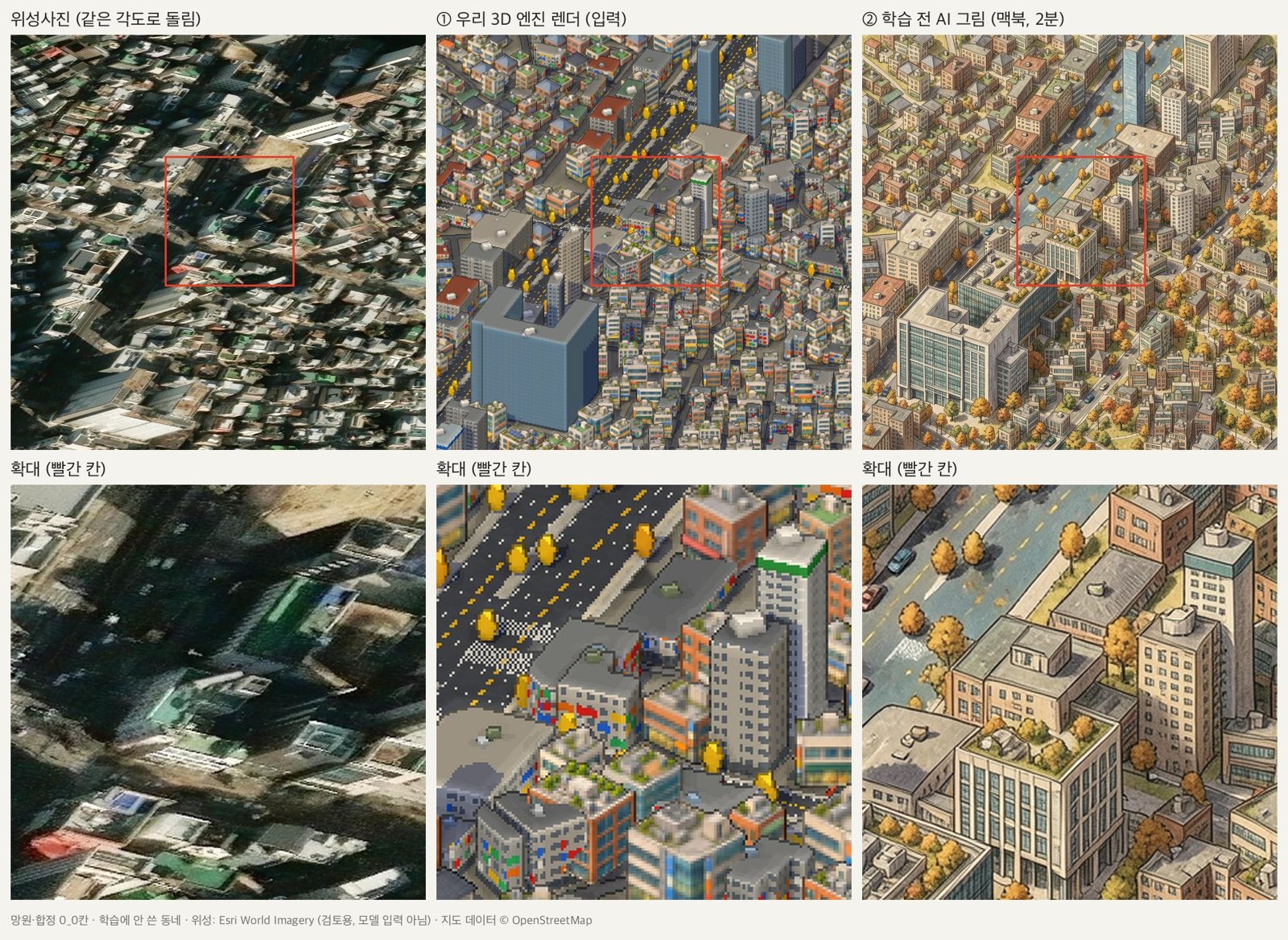
I trained an edit LoRA on FLUX.2 klein 4B (Apache 2.0). Input is the engine render, target is a painting of the same tile.
| Run | Hardware, tool | Pairs | Settings | Speed | Outcome |
|---|---|---|---|---|---|
| r1 | MacBook M3 Pro, mflux | 92 | 768 px, rank 16, 8-bit, 1,104 steps | 77 s/step | ~4 nights projected. Stopped after finding input/target mismatch |
| r2 | MacBook | 33 | 512 px, 396 steps | 57 s/step | Invented water on the distilled model. Undertrained |
| r3 | Kaggle 2× T4 (free), ai-toolkit | 33 | 512 px reference, 1,000 steps, rank 32/64 | 31–35 s/step | Coarse detail; canals and forest islands remained |
| r4 | Modal A100-80GB, ai-toolkit | 33 | 1024 px ref and target, no quantization, rank 64, 1,500 steps | 2.41 s/step | Shipped |
Where it got stuck:
The training data was wrong. I warped satellite imagery (used for review only, never as model input) into the camera angle and compared. Where OSM was missing buildings, the target paintings had filled the empty land with forest. The model was learning "empty lot = forest". Worse, between captures the engine had started filling empty blocks with placeholder buildings, so inputs and targets no longer matched. pairscore.py kept only pairs where fewer than 6% of real buildings were missing from the input and less than 20% of the target was invented. That left 33 pairs.
The model kept inventing water. A LoRA trained on the base model, when plugged into the fast distilled model, turned wide roads into canals. Same result on all four random seeds, so it was learned behaviour, not noise. Run on the base model, the canals went away. Final inference uses the same FLUX.2-klein-base-4B it was trained on.
OOM on a T4, always at step 3. fp16 went NaN (a known FLUX-family issue), fp32 was as slow as the laptop, and bf16 died at step 3 every time, through defragmentation, rank 16 and CPU offload. Reading the trainer's code, I found it fed the edit reference at its original size: a 1024 px reference against a 512 px target, 4× the tokens. A 512 px reference finished at 27 s/step. If it dies at the same step every time, look at input size before settings.
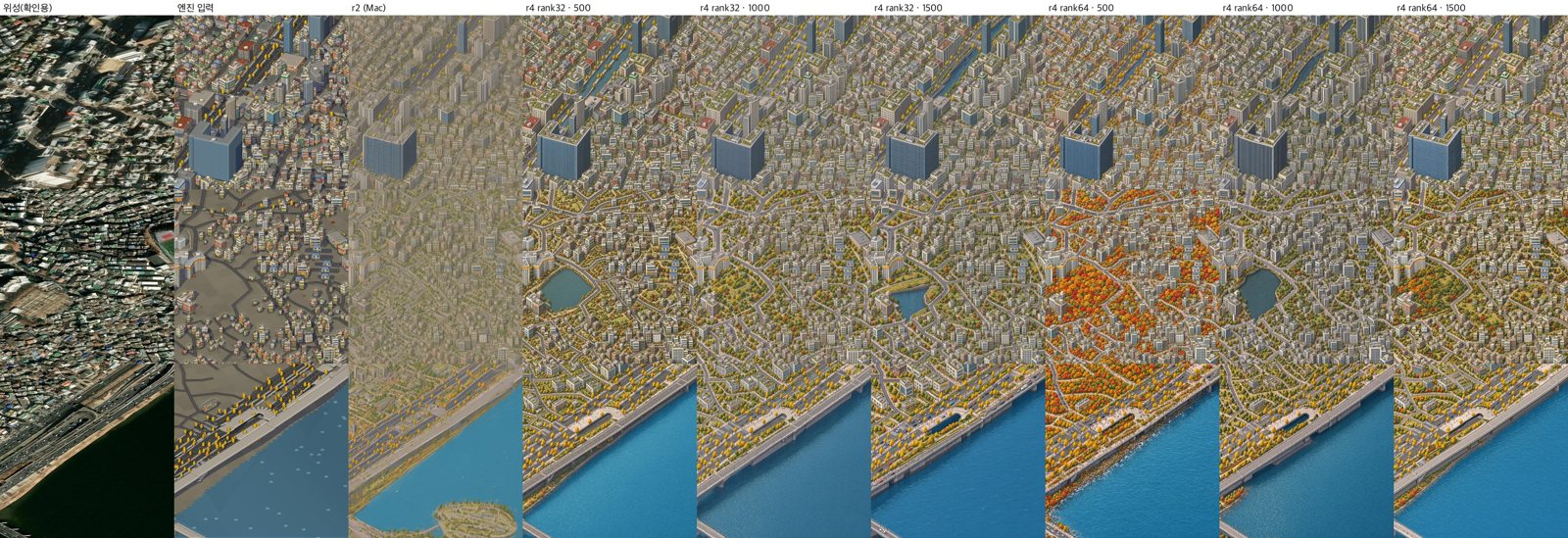
Rank and steps. r4 trained rank 32 and rank 64 in parallel for 1,500 steps (about 65 minutes). Rank 32 painted canals and ponds at 500, 1,000 and 1,500 steps. Rank 64 still had them at 1,000 and settled at 1,500. On 16 held-out tiles: zero invented water. On 3 test tiles × 2 seeds: 0/6.
# ai-toolkit config generated by train_modal.py (excerpt)
network: {type: lora, linear: 64, linear_alpha: 32}
train: {batch_size: 1, steps: 1500, lr: 0.0001, optimizer: adamw8bit,
        gradient_checkpointing: true, dtype: bf16, noise_scheduler: flowmatch}
model: {arch: flux2_klein_4b, name_or_path: black-forest-labs/FLUX.2-klein-base-4B,
        quantize: false, quantize_te: true}
Operational mistakes. A resume script that found no checkpoint returned the directory listing instead, and the first overnight run died after one second; I found out three hours later. Later, loading the finished LoRA just to sample, ai-toolkit ignored the saved step count and retrained from step 0, and killing the local process did not stop the remote app. Since then every sampling run, including the full city, is a "training job that is already finished":
# convert: sample only, no training (start_step = steps) — simplified
return run(name, steps, rank, 1024, 100000, W='/vol/conv', lora=f', pretrained_lora_path: {lora_path}',
           items=items, extra_train=f'\n        skip_first_sample: true\n        start_step: {steps}')
The night run: 51 minutes
I timed 6 tiles × 4 settings on an A100:
| Setting | Per tile | Notes |
|---|---|---|
| 8 steps, guidance 3 | 8.6 s | baseline |
| 8 steps, guidance 1 | 4.1 s | ground and ripples slightly flatter; structure, buildings, colour nearly identical |
| 6 steps, guidance 3 | 5.8 s | |
| 6 steps, guidance 1 | 3.2 s | |
| 4 steps, guidance 1 | 2.3 s | ground goes soft |
Guidance 1 turns classifier-free guidance off. At the same 8 steps it more than halved the time per tile. None of the settings invented water. At 8 steps and guidance 1, 6,000 tiles came to about 6.8 hours of GPU, roughly $17, inside my remaining free credit.
The run: 01:01, engine capture starts (headless Chromium, 1024×1024 viewport, UI, trees and the live layer hidden, about 0.7 s per tile). 02:37, 10 A100 containers start converting, 628–629 tiles each, 4.9 s per tile. 51 minutes later all 6,394 tiles were done. Zero errors, zero OOM, zero NaN, zero missing tiles.
Total Modal usage up to that point was $35.88, including $30 of free credit. It was above my $31 estimate because each container loads the model before it starts.
Making 6,394 paintings into one
Each tile is painted independently. The fix-up chain makes them one image.
Water QA. Because engine and painting share pixels, I can ask: where the engine has water, is the painting blue? A tile fails if fewer than 85% of engine-water pixels satisfy B > R + 30 && B > G. Of 949 tiles with water, 194 were at least 80% water, and 176 of those failed. Tiles in the middle of the Han, with no bank in view, were painted as autumn forest. The training set had no water-only tiles.
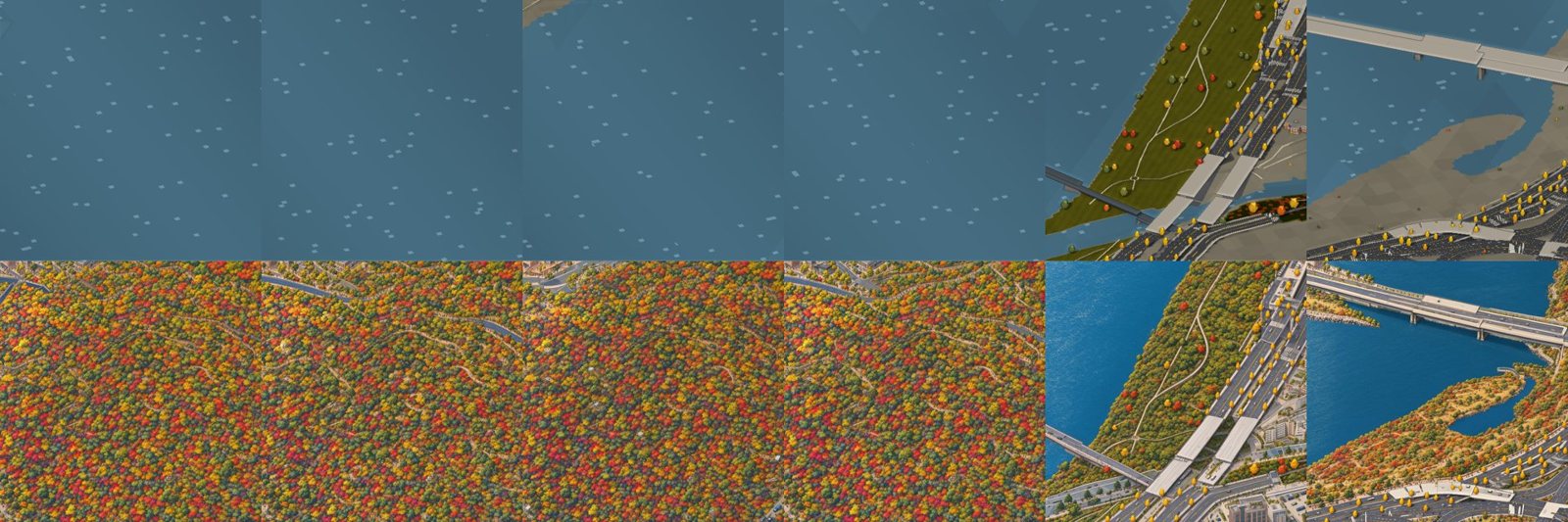
The fix rebuilds water in three layers: one city-wide blue, a slow brightness field in canvas coordinates (so it continues across tiles; the first version used per-tile references and the river showed squares), and ripples, taken from the tile itself if it kept its water, procedural otherwise.
# water_fix.py (excerpt)
det = OWN * (o - lp(o, 6)) if blue >= 0.85 else ripples(t)
new = np.clip(PM + field(t)[..., None] + det, 0, 255); out = o * (1 - a) + new * a
Colour seams (harmonize). Each tile's colour drifts a little, so the grid showed. Unknowns: log gains at 3×3 control points per tile and channel. Constraints: neighbouring overlap strips should match, plus terms pulling gains to zero and keeping them smooth. One sparse least-squares solve (lsqr) at 1/8 scale, gains upsampled bilinearly. Overlap differences dropped to about a quarter.
Ghosting (build_pyramid). At first I faded linearly across the full 256 px overlap. Where two tiles drew the same building slightly differently, you got a translucent double. Now each tile owns the central 768 px cell and blending happens only in 96 px around each cell border:
def ramp():  # weight of this tile in cell-local coords -R/2..C+R/2 (R=96, C=768)
    u = np.arange(-R // 2, C + R // 2, dtype=np.float32)
    return np.clip(np.minimum(u + R / 2, C + R / 2 - u) / R, 0, 1)
Alpha comes from Seoul's real administrative boundary, projected with the same camera and terrain, feathered over 160 px. The map ends in the shape of Seoul, not a staircase of tiles.
Long things break across tiles. The same Han bridge sat up to 40+ px apart in neighbouring tiles, with different widths and lane designs. Shifting tiles failed. Normalising deck width and sharpening the blend near bridges (w ** (1 + 3 * bridge_mask)) removed ghosts but not the design steps. What worked: repaint each bridge bank to bank in one image. 24 crossings; the 15 long ones split into two overlapping images, the second continuing from the first. 37 images.
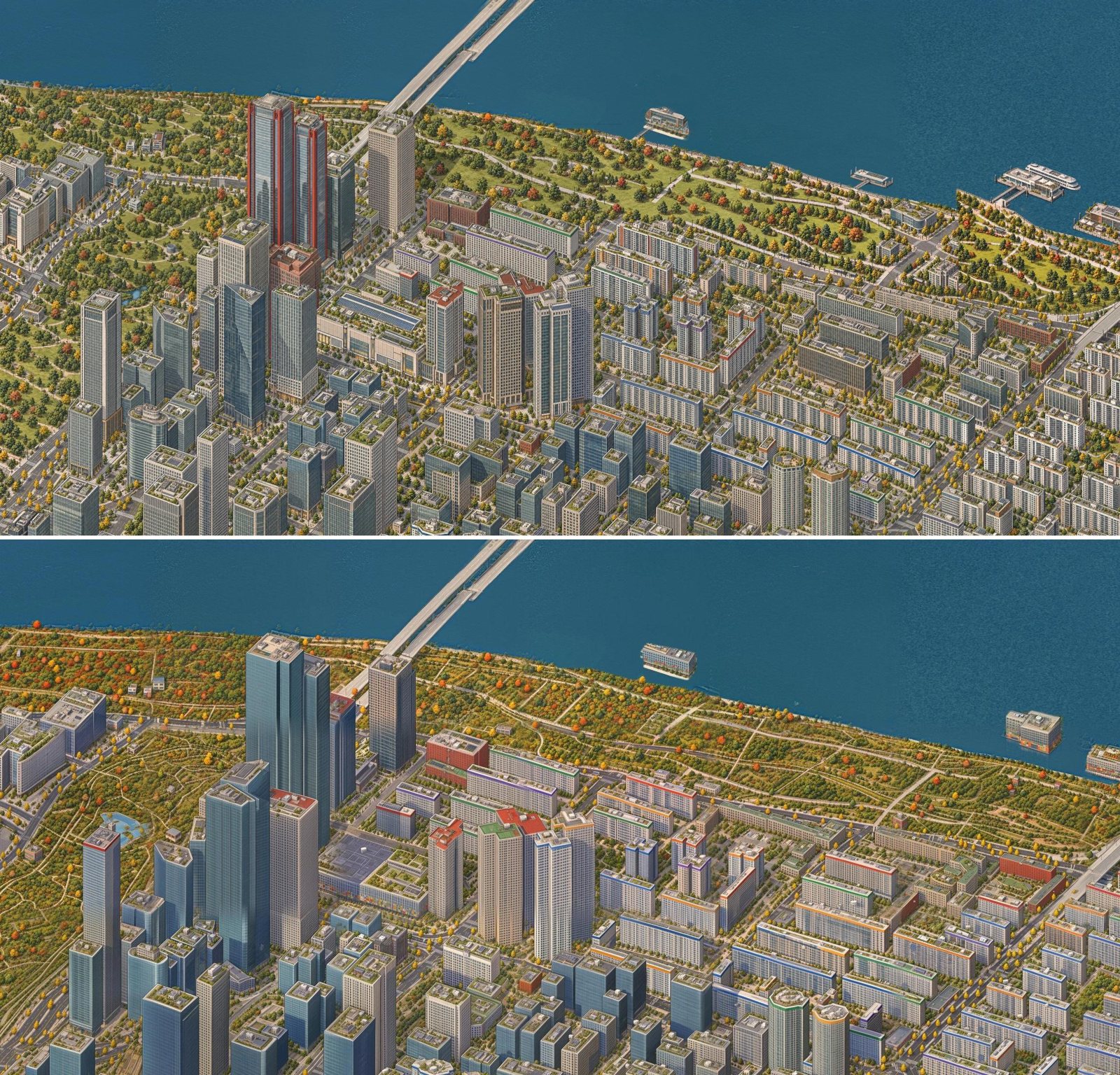
Landmarks, which the model painted as generic buildings, got the same treatment. lm_prep.py projects the OSM footprint and height onto the painting in red (minus anything occluded by buildings in front, or the repaint erases them), and only the marked area is repainted. lm_apply.py aligns the result with ECC affine registration on pixels well outside the mark and saves a feathered patch in world coordinates. Alignment error stayed under about 0.6 px.
Yeouido taught the general rule. My carefully painted per-tile GPT version stepped at every tile border. After days of fixes I switched it off and used the model's seamless painting, repainting only the 63 Building, IFC, Parc1 and Yeouido Park on top. A continuous whole beats pretty fragments.
A lot of model mistakes were data mistakes
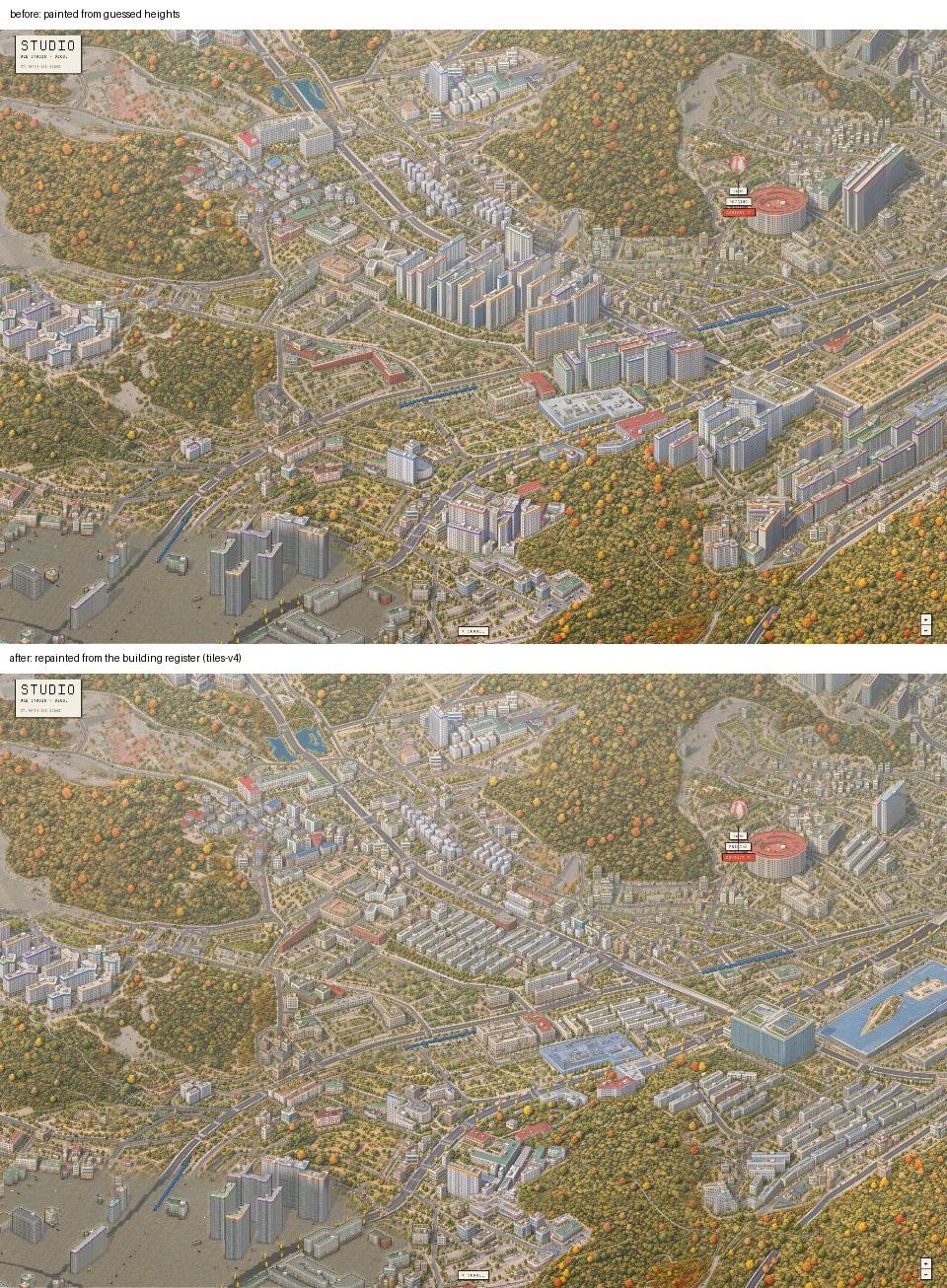
Low buildings kept getting painted as apartment towers. Only 92k of ~585k buildings (16%) had a real height; the estimates pushed wide, low markets and schools into tower-sized blocks, and the model painted them, faithfully, as apartments. I joined the national GIS building dataset from Korea's Ministry of Land, Infrastructure and Transport (MOLIT), which carries attributes from the building register (건축물대장, the official record of every building). Matching "30% of our footprint" turned a 15 m shop into 250 m; requiring 50% overlap in both directions, and keeping real OSM heights, mostly worked (one more rule caught a podium that had inherited a whole tower site's height). 204k buildings got official heights (the 63 Building went from 37 m to 250 m). I repainted the 1,747 tiles whose wall area changed by more than 4%, and southwest Seoul went back from 15–25-storey blocks to 3–5-storey alleys.
A pre-launch catch: the 63 Building. A last check found a giant gold podium painted over the mid-rise blocks in front of the 63 Building. The cause was data. When I filled missing heights from the building register, the whole complex outline (115×133 m) inherited the tower's 249 m, and I had marked that outline in red. GPT did as told and filled it. The fix was a two-colour mark: red for what is real (the tower at 250 m and a 14 m podium), blue for things the model had drawn from bad data, with the instruction "no building here, continue the riverside park behind". GPT ignored the blue the first time and kept the grey slab. So I pre-filled the blue area of the reference image with OpenCV inpainting, which left nothing to copy. Buildings standing in front are cut out of the mark using the engine's building heights. IFC had the opposite problem: the old painted tower was wider than the mark, so its flat roof ghosted beside the new faceted spire. Pre-filling the whole mark in the reference (prefill=True) removed anything to copy. Lesson: the mark is exactly what gets overwritten, so look at the surroundings first.
Deep dive 2: painted tiles under a live 3D city
The painting covers the engine's static city. But cars, people and events have to stay visible on top of it and still disappear behind buildings.
The moving things are drawn a second time into a mask, in white. That pass shares the main pass's depth texture, with depth test on and depth write off. A car behind a building is hidden in the mask too, so the painting stays there.
// mask material: same transform as the engine shader, nudged toward the camera (simplified)
const moveMat = new THREE.ShaderMaterial({ side: THREE.DoubleSide, depthWrite: false, depthFunc: THREE.LessEqualDepth,
  vertexShader: `... gl_Position.z -= .0004 * gl_Position.w; }`,
  fragmentShader: 'void main() { gl_FragColor = vec4(1.0); }' });
// POST_FS: the painting covers only where the mask is empty
vec4 p = texture2D(tPaint, vUv);
float mv = texture2D(tMove, vUv).r;
c = mix(c, p.rgb / max(p.a, 1e-3), p.a * (1.0 - mv));
c += texture2D(tGlow, vUv).rgb;
The moving things themselves come from the low-res main pass, so they get the same pixel size, the same depth outlines, the same AO and the same sun and night colour as the buildings. That is why a car does not look pasted on. Hold on to that; it matters in deep dive 4.
Two problems on the way:
- Additive light effects (searchlights, fireworks) were caught by the mask. Wherever a beam passed, the painting was cut away and the bare engine showed through. I moved light effects to camera layer 2, rendered them into their own
rtGlow, and added them last. Now a beam brightens the painting instead of punching a hole in it. - Trains on curves looked jagged when each car was rotated by the track angle at one point. Each car now stands on two bogie points:
// each car stands on front/back bogies (±8 m); cars 20 m apart
const dc = t.d - t.dir * c * 20; run.at(dc + 8, f); run.at(dc - 8, b);
const x = (f.x + b.x) / 2, z = (f.z + b.z) / 2, a = Math.atan2(f.x - b.x, f.z - b.z);
Night is data, not another painting. Repainting night tiles would double the cost. Instead the browser tints the painting dark and lights.py adds windows computed from engine buildings with the same camera, with whole floors switched off by a deterministic hash. 9,704 tiles, 6 minutes locally, $0. One trap: after I repainted Namsan Tower, the night layer kept lighting windows in the office box the model had first drawn under it. Fix the painting and you must fix what was derived from it.
Performance. Loading all of Seoul at once took 10–15 s to the first frame, with a median frame of 18 ms and spikes of 70–100 ms. The GPU was drawing the full 3D city every frame under the painting: 26.9M triangles and 1.7M instances (450k trees alone were 9.1M triangles). three.js draws every instance of an InstancedMesh. engine/cull.mjs sorts instances into 400 m ground cells ahead of time and, whenever the visible cell range changes, copies only visible cells to the front of the buffer:
for (let cx = cx0; cx <= cx1; cx++) for (let cz = cz0; cz <= cz1; cz++) {
  const r = range.get(`${cx},${cz}`); if (!r) continue;
  dm.set(SM.subarray(r[0] * 16, r[1] * 16), k * 16);   // one cell = one contiguous range
  k += r[1] - r[0];
}
mesh.count = k;   // + addUpdateRange(0, k * 16) uploads only the front
Same Yeouido view: 1.7M instances to about 5k, JS memory 2.2 GB to 0.75 GB, 46 to 73 fps. Skipping alley road surfaces under the painting took triangles to 4.2M, and pre-baking parked-car, pedestrian and street-tree positions in Node with the same worker code cut city build time from about 7 s to 1.25–1.5 s.
Deep dive 3: real subway positions on 1,000 calls a day
The original subway was fake. Above-ground track segments joined together, one train every 2.6 km, random speed between 16 and 22 m/s, hidden in tunnels. Right before launch I replaced it with real operating data.
The data. The Seoul Open Data Plaza has a real-time train position API. It does not give coordinates. It says which train entered, arrived at, or departed which station: train number, station name, direction (up/down; inner/outer loop on Line 2), status, and timestamp. One key allows 1,000 calls per day, and the terms forbid sharing or exposing the key.
Which lines. Only above-ground track is visible on the map, so I measured it per line (Line 1 family 195 km, Gyeongui–Jungang 99 km, Line 2 31 km, down to 9 km). Lines 1, 2, 3 and Gyeongui–Jungang get real data; the rest stay simulated.
Visitors never call the city.
visitor browser ──(every 5 min)──▶ /api/subway  (Vercel function + CDN cache, 10 min)
                                       │  once per 10 min
                                       ▼
                           Seoul real-time train position API (4 lines = 4 calls)
The key lives only in a server environment variable. The function sets s-maxage=600, so the CDN serves the same copy for 10 minutes. However many visitors there are, the city API is called 4 times per 10 minutes per region: 576 calls a day.
// api/subway.js (simplified)
res.setHeader('cache-control', 'public, max-age=60, s-maxage=600, stale-while-revalidate=300');
If the quota runs out or the city returns an empty response, the function keeps serving the last good data. If there is none, the client falls back to simulated trains for that line only. Trains never vanish. One catch: CDN copies are per region, so overseas traffic multiplies calls by the number of regions. The plan is to register the project as a use case with the open data portal to raise the limit.
Station names to map points. The API gives names only. I tried the Overpass API for station coordinates; it timed out twice. So I pulled 524 station nodes directly from the OSM extract (.pbf) the map was built from, projected with the map's own formula:
const proj = (lat, lon) => [(lon - LON0) * KX, -(lat - LAT0) * KZ]; // same origin and scale as the map
When a name matches several stations, I take the candidate closest to that line's above-ground track. A station more than 220 m from the track is treated as underground, and trains there are not drawn. They are in the tunnel.
Which way is "up"? Nothing says which screen direction along the track the API's up/down means. I took two snapshots two minutes apart (8 calls) and collected the 97 trains that moved from station A to station B. That gives samples of "this line, this direction, near here, moves this way". At runtime, for a train at a station, I find the nearest learnt sample for the same line and direction, and take the sign of its dot product with the track tangent.
// engine/realtrains.mjs (simplified)
const dir = Math.sign(tangentAt(station).dot(nearestLearntMove(line, updn, station)));
const off = { 0: -250, 1: 0, 2: 30, 3: -800 }[status];   // entering, arrived, departed, left previous station
const d = station.d + dir * (off + Math.min(7000, secondsSinceReport * 11));
Filling the 10 minutes. Data can be up to 10 minutes old. From the report time, each train keeps moving at 11 m/s, the average subway speed including dwell time. When new data arrives, trains with the same number glide to their new position over 6 seconds instead of teleporting. Real trains take over the line's instanced-mesh slots; leftover slots are parked off-screen at y = −999.
Deployment. With a static setup (outputDirectory: ".", empty build command), files in api/ did not become functions and returned 404. Declaring functions in vercel.json fixed it.
The honest result. Right after deploy, 155 trains were running and 45 of them were above ground and drawn. The fake version had about 140 trains spread evenly. Real data made the map emptier, because most trains are underground at any moment. I have not decided yet between showing it honestly and making it look busy. Two bugs showed up immediately: a 3 km cap on dead-reckoning made trains stop mid-track between updates (raised to 7 km), and trains that ran past the end of the track piled up there (now hidden).
It is not real-time in the strict sense. Data is up to 10 minutes old and positions in between are predicted. So the site says "driven by real operating data", not "real-time subway".
Deep dive 4: mobile GPU memory and the flicker
Resolution. The renderer's pixelRatio was 1, so Retina screens and phones got a 1× image stretched up. The final output and the paint layer now render at device resolution (up to 2×); the engine main pass stays low-res for the pixel look. On a 6K monitor, 2× means 24 Mpx per frame, and the night view once came out black, so output is capped at about 8.3 Mpx:
DPR = Math.max(1, Math.min(2, devicePixelRatio || 1, Math.sqrt(8.3e6 / (w * h))));
Flicker. Stepping through an iPhone screen recording frame by frame: at night, painted tiles flickered square by square, then the whole painting vanished and only the engine was left. I read that as GPU memory exhaustion. Three things stacked up. At 2× the loader picked finer levels, so the cache filled faster. Night-light textures were not counted in the budget at all. And mipmaps added about 33% to every texture.
A 768² RGBA8 tile is about 2.4 MB, about 3.1 MB with mipmaps (back-of-envelope, not measured). The old phone budget of 72 tiles was about 227 MB for paintings alone, with lights potentially doubling that at night. The new budget is 56 tiles including lights, no mipmaps, about 132 MB.
const COARSE = matchMedia('(pointer: coarse)').matches || new URLSearchParams(location.search).has('coarse');
const MAX_PYR = COARSE ? 56 : 140;
// upload: no mipmaps on phones (levels are chosen per device pixel, so little minification)
tx.minFilter = COARSE ? THREE.LinearFilter : THREE.LinearMipmapLinearFilter; tx.generateMipmaps = !COARSE;
I checked it on desktop with ?coarse to emulate the phone budget, panning the night view in 40 steps and logging how much of the screen the painting covered: 0.8–1 while panning, 1 at rest. I have not re-checked on a real iPhone yet.
The loader around it matters as much. Missing tiles are covered by the nearest level already shown, requests are queued nearest-to-centre 8 at a time and aborted if stale, decoding runs through createImageBitmap, and at most 3 textures go to the GPU per frame.
Numbers
| Item | Value |
|---|---|
| Tiles | 6,394 (603 km²) in the first pass; 6,470 after extent and terrain fixes |
| Tile spec | 1024 px, 0.3 m/px, 768 px stride (256 px overlap), 96 px border blend |
| Training data | 33 filtered pairs (engine render ↔ painting) |
| Model | FLUX.2 klein base 4B edit LoRA, rank 64 (alpha 32), 1,500 steps, lr 1e-4, bf16 |
| Training speed | MacBook 57–77 s/step → Kaggle T4 27 s → A100 2.41 s |
| Inference | 8 steps, guidance 1; A100 4.1 s/tile (test), 4.9 s/tile (full run) |
| Full city conversion | 10 A100s in parallel, 51 minutes, 0 errors |
| GPU spend | Modal ~$36 to first complete map (incl. $30 free credit); $44.98 cumulative as of Oct 23 |
| Buildings | ~585k, 204k with official heights |
| Han River bridges | 24 crossings, 37 repainted images |
| Night lights | 9,704 tiles, 6 min locally, $0 |
| Tiles served | 768 px WebP z0–8, ~2.0 GB + 439 MB lights, 22,186 files |
| Render | instances 1.7M → ~5k, triangles 26.9M → 4.2M, 46 → 73 fps, JS memory 2.2 GB → 0.75 GB |
| Loading | worker ~7 s → 1.25–1.5 s; first painted frame under 2 s |
| GPU texture budget | desktop 140; phone 72 → 56 (lights included, no mipmaps) |
| Subway | 4 real lines, 576 API calls/day, 155 trains running / 45 drawn at deploy |
| Characters | 36 from Korean folklore |
What I'd do differently
- Multiply before generating. Tiles × cost × quota × days. Not doing it cost me two days.
- Suspect the input first. Forest on empty lots and villas turned into towers were data problems, not model problems.
- Same failure at the same step means input size. Reading the trainer's source was faster than any tuning.
- Don't trust your training tool's state. It ignored a loaded LoRA's step count and retrained; the remote app kept running after the local process died.
- A continuous whole beats pretty fragments. Anything long (riverbanks, bridges) gets repainted in one image.
- Keep the camera fixed and many things come for free: automatic QA, alignment, night lights, occlusion, click targets.
- Put every texture in the GPU budget. One missing texture type and the hidden 33% of mipmaps took the phone down.
- Decide how honest live data will look before wiring it up. Real trains made the map emptier.
Credits and data sources
- Inspired by isometric.nyc by Andy Coenen. HypeSeoul is an independent project with no official relationship.
- © OpenStreetMap contributors, available under the Open Database License (ODbL)
- Overture Maps Foundation buildings theme (ODbL), which includes OpenStreetMap, Microsoft Global ML Building Footprints (ODbL), and Google Open Buildings, Esri Community Maps and Shi et al. East Asian buildings (Zenodo 8174931) under CC BY 4.0
- Korea Ministry of Land, Infrastructure and Transport (MOLIT), GIS building dataset (building register / 건축물대장 attributes), CC BY
- Terrain: AWS Open Data Terrain Tiles (Terrarium; Mapzen Joerd, built from SRTM and other public elevation data)
- Seoul Metropolitan Government public data (Seoul Open Data Plaza, real-time subway positions)
- Satellite imagery was used only for visual review, never as model input (Esri World Imagery)
- Model: FLUX.2 klein 4B (Apache 2.0); training with ai-toolkit (MIT, Ostris); rendering with three.js